
Setting up a home laboratory is one of the best ways to test software, practice networking, and build projects. But a massive headache eventually pops up: How do you access your lab computers when you are away from home?
Traditionally, people use “port forwarding.” This means opening a digital window on your home router so traffic from the outside world can connect to your internal machines. The problem? Automated malicious bots constantly scan the internet for these open windows. Within minutes of opening a port, your router is bombarded with brute-force attacks.
To solve this, I designed a secure remote access architecture for my homelab. It lets me control my entire environment from a standard web browser anywhere in the world. It completely hides my home network from internet scans and is smart enough to handle unexpected power outages or reboots automatically.
The Big Picture Architecture
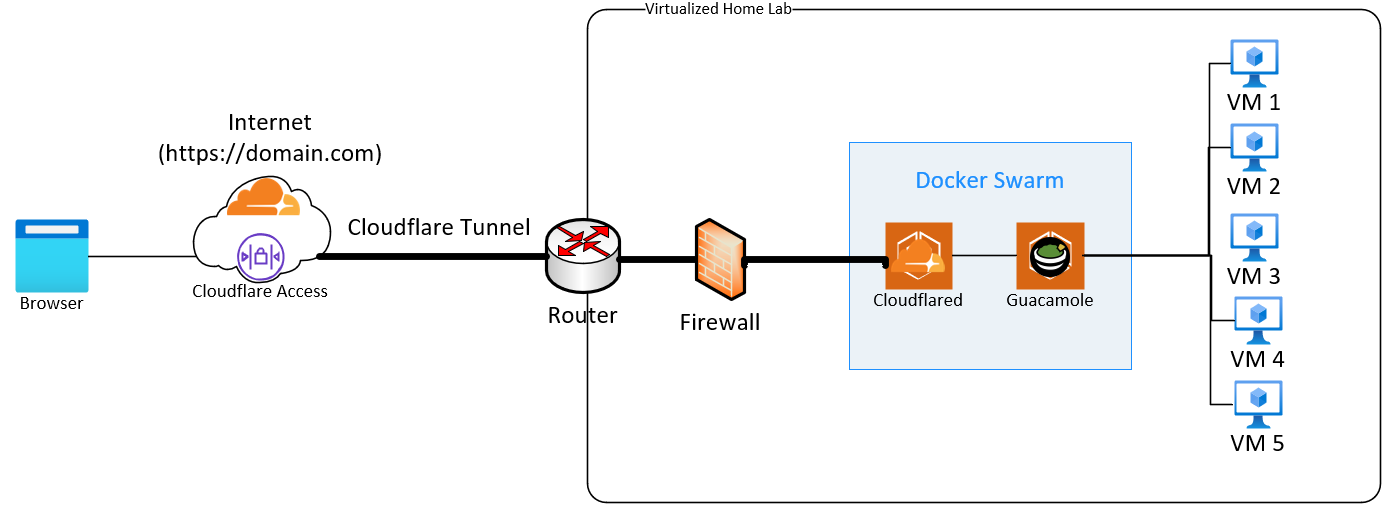
Instead of letting the internet knock on my home router’s front door, this setup flips the script. The lab connects outbound to a secure intermediary, creating a completely isolated loop.
Here is exactly how the traffic flows when I access my lab:
The Secure Edge: I type my custom domain into a browser. The connection hits Cloudflare’s global network, which acts as a protective shield.
The Invisible Tunnel: Cloudflare routes the traffic down a private, outbound-only tunnel daemon (
cloudflared) running inside my lab. Because my lab initiated this connection from the inside out, my home router’s firewall stays completely closed to the public web. To hackers, my home IP address looks totally dark.The Private Virtual Wire: Once traffic leaves the tunnel, it enters a hidden, internal container network (
guac-network). Using a technology called an Overlay Network, this virtual wire allows containers sitting on entirely separate computers in my lab to talk directly to each other using simple names, completely isolated from my home network.The Web Dashboard: The traffic is picked up by Apache Guacamole running inside a Docker Swarm cluster (a tool that teams my separate lab computers together). Guacamole translates the screens of my target lab machines (like Ubuntu or Kali Linux) directly into standard web-friendly code.
I don’t need any special remote desktop apps on my phone or laptop. I just open Chrome or Firefox, log in, and I have full desktop control and seamless drag-and-drop file sharing.
Making the Lab Self-Healing
Building the network is only half the battle. If you run a multi-node lab at home, you have to design for reality: system updates, planned maintenance, and sudden power outages.
In a multi-computer cluster, order matters. If your web applications try to launch before your internal database or your worker nodes are fully awake, containers crash, configurations break, and your remote access links fail.
To make my homelab truly resilient, I wrote two background automation scripts that act as an automated flight controller for the hardware.
1. The Smart Boot Manager
When my lab hardware powers on, a custom script pauses the deployment of my public applications. It sits in the background and follows a strict rulebook:
It continuously checks the low-level cluster network until all lab computers report that they are healthy and online.
It flips the worker computers from a defensive “Standby” (
Drain) mode into an active state.It launches the Cloudflare Tunnel stack first to establish the secure internet pipeline.
It waits a few seconds for the connection to settle, and then fires up the Apache Guacamole desktop stack behind it.
2. The Graceful Shutdown Intercept
When I click “Shut Down” on my host machines via VMware, the operating system normally kills all running applications immediately. This risks corrupting active database records and harshly disconnecting running sessions.
To fix this, I created a custom configuration that alters the standard Linux shutdown behavior:

By changing how the systemd service dependencies link together, I force the operating system to keep the Docker engine fully alive and processing commands during a shutdown. The script intercepts the power-off signal, gracefully disconnects active web users, cleanly tears down the container stacks, and parks the cluster nodes in a safe, quiet state before the virtual hardware turns off.
Enforcing True Zero Trust with Cloudflare Access
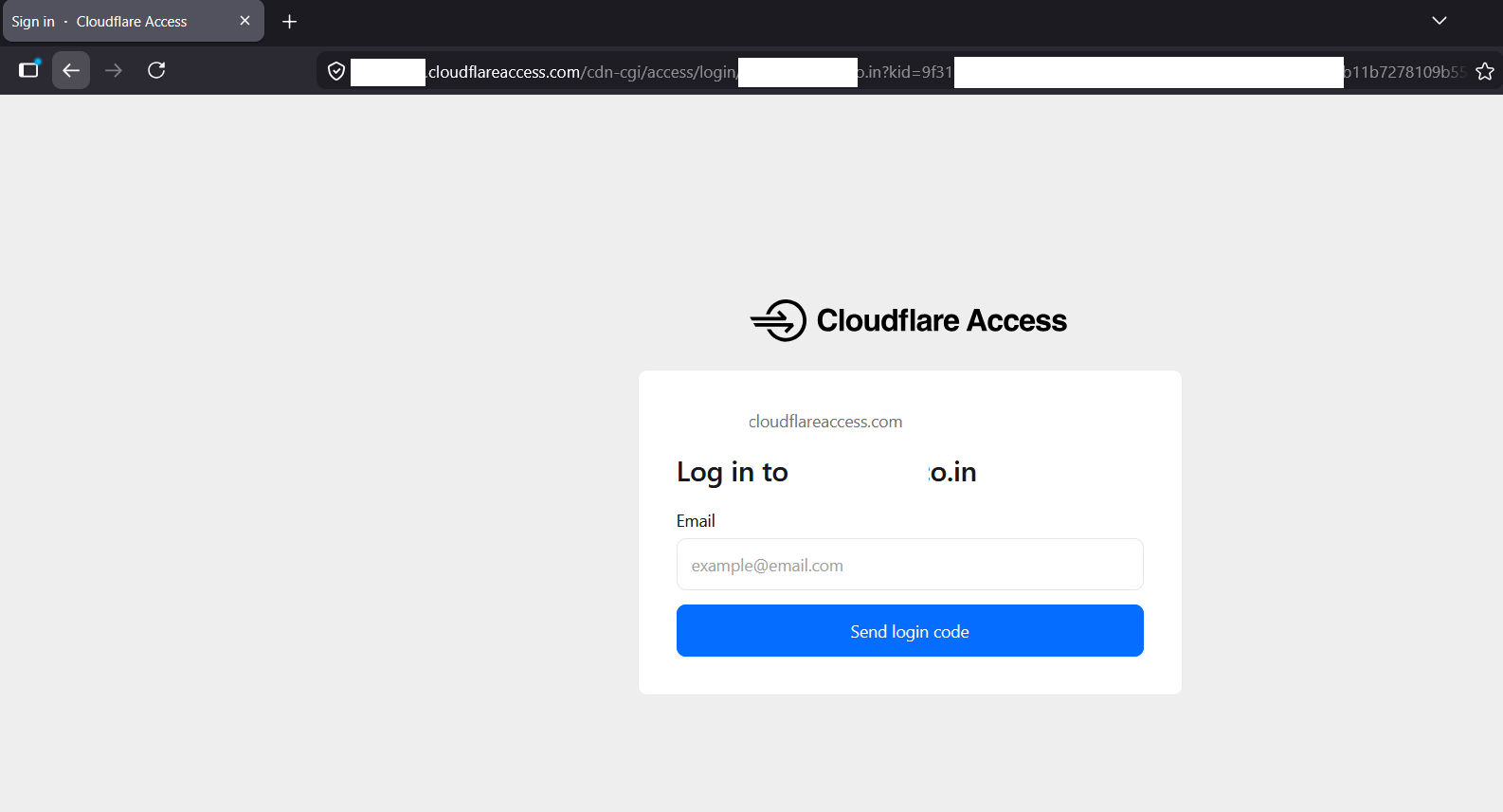
While the Cloudflare Tunnel setup described above successfully hides your home IP and completely eliminates port forwarding, a tunnel alone functionally acts as an outbound reverse proxy. To achieve a strictly defined “Zero Trust” architecture, we must verify identity before any traffic is allowed to route to the homelab network.
By layering Cloudflare Access on top of our tunnel, we create an invisible, authenticated perimeter at the edge. Anyone attempting to visit the Guacamole URL must first pass a strict identity check. If they aren’t authorized, Cloudflare drops the connection immediately—meaning unauthorized users and automated scanners never even get to see the Guacamole login screen.
Proof of Concept
Sharing a few images from this setup: